How to reach the Sobeys People Portal, sign in with your Employee ID, find a pay statement or T4, and get help when your account is locked — without entering your details on an unofficial site.
Open www.peopleportal.sobeys.com (include the “www”). It sends you to a Sobeys sign-in page hosted by SAP SuccessFactors that says “Welcome to your People Portal.” Enter your Employee ID and password. Former employees select Continue on the same page to reach pay and tax statements. Stop before five failed attempts — the account locks after the fifth.
What do you need to do?
Sobeys People Portal at a glance
These details come from the live Sobeys sign-in page, checked in October 2026.
| Starting address | www.peopleportal.sobeys.com — in our check, the address without “www” did not load |
|---|---|
| Sign-in page hosted by | SAP SuccessFactors (company ID: Sobeys) |
| What you enter | Your Employee ID and employee password |
| Failed attempts allowed | Five — after that, the account is locked |
| Unlocking a locked account | Call the IT Service Centre; the password assistant cannot unlock it |
| Technical difficulties | Solution Centre: 1-877-425-1845, as listed on the sign-in page |
| Former employees | Select Continue for the separate Tax & Pay Slips service |
| HR Service Centre | 1-800-295-3348 or hrservicecentre@sobeys.com, as listed in Sobeys’ login job aid |
| Language | English or French (select FRANÇAIS) |
| First time signing in | Use the How to Login link on the sign-in page |
What is the Sobeys People Portal?
The People Portal is the self-service website Sobeys employees use for their own HR records. When Sobeys rolled it out to Safeway workers in March 2021, the union notice listed what it could do:
Your pay and tax records
- Pay statements
- T4 income tax slips
- Employment verification letters
Your profile and career
- Update personal information
- Upload required documents
- Internal job postings and courses
Your own menu can look different. Banner, province, payroll group and job status all affect which tiles you see. If your screen does not match a guide, follow what your account shows. See People Portal tools explained for more.
The People Portal is also separate from a Sobeys or Scene+ shopping account. Your customer email and Scene+ number will not sign you in.
How to sign in to the Sobeys People Portal
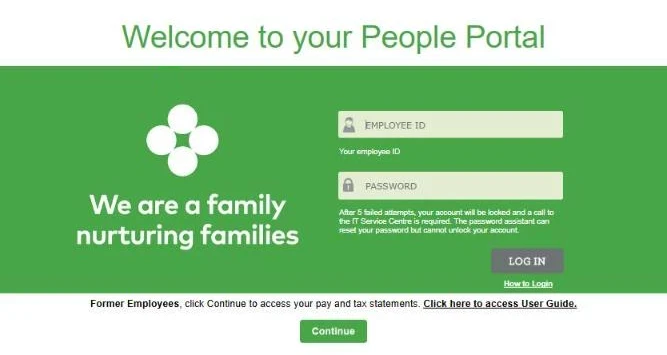
- Open the official address. Type www.peopleportal.sobeys.com yourself, or use the link Sobeys gave you. Don’t sign in through a search ad or an unfamiliar site.
- Check where you landed. You should see “Welcome to your People Portal” on a page at performancemanager4.successfactors.com that names Sobeys as the company. That SAP address is normal.
- Enter your Employee ID. It is on your onboarding paperwork. It is not your Scene+ number or email.
- Enter your password. Type it by hand rather than using an old saved password. Check Caps Lock and the keyboard language.
- Select Log in and wait for your dashboard. Then open the tile you need, such as pay, tax or personal information.
- Sign out when you’re done, especially on a shared store or family computer.
Open the official People Portal ↗
New employees: there is no public sign-up
You can’t register for a Sobeys employee account yourself. Sobeys creates it from your hiring record, and you get an Employee ID and first-login instructions through onboarding. If they’re missing, ask your manager or HR contact — a new record can take a little time to reach every system. Our new-hire first-login guide walks through it.
Forgot your password or locked out?
Not locked yet
- Stop after two or three failed tries
- Check Caps Lock and keyboard language
- Confirm the Employee ID is right
- Select Forgot password? at the bottom right. A chat assistant asks for your Employee ID and last name, then resets the password
Already locked
- The password assistant can’t unlock it
- The sign-in page says a call to the IT Service Centre is required
- For technical difficulties, it lists the Solution Centre at 1-877-425-1845
- See our locked account guide
Pay statements and T4 slips
A pay statement covers one pay period: earnings, deductions, taxes and net pay. A T4 is the Canadian year-end tax slip that reports your yearly employment income. Both were named as People Portal functions in the 2021 rollout.
Pay statement
Open the pay area in your dashboard, choose the payment date, and save the PDF on a private device.
Full pay statement guide →T4 tax slip
Open the tax documents area, pick the tax year, and check your name and year before filing.
Full T4 guide →Former employees: pay and tax statements
If you no longer work at Sobeys, select Continue under the Former Employees message on the sign-in page. It opens a separate Tax & Pay Slips service. According to Sobeys’ user guide for former employees:
- You register once with your name and a personal email, then confirm the email.
- You confirm your identity with your SIN, former Employee ID and date of birth. You get 5 attempts before the account is permanently blocked.
- You can open Pay Slips by payment date and Tax Slips by year, then view, print or download them.
- Access lasts until April 30 of the year after you leave. Your screen shows the exact Access Expiration Date.
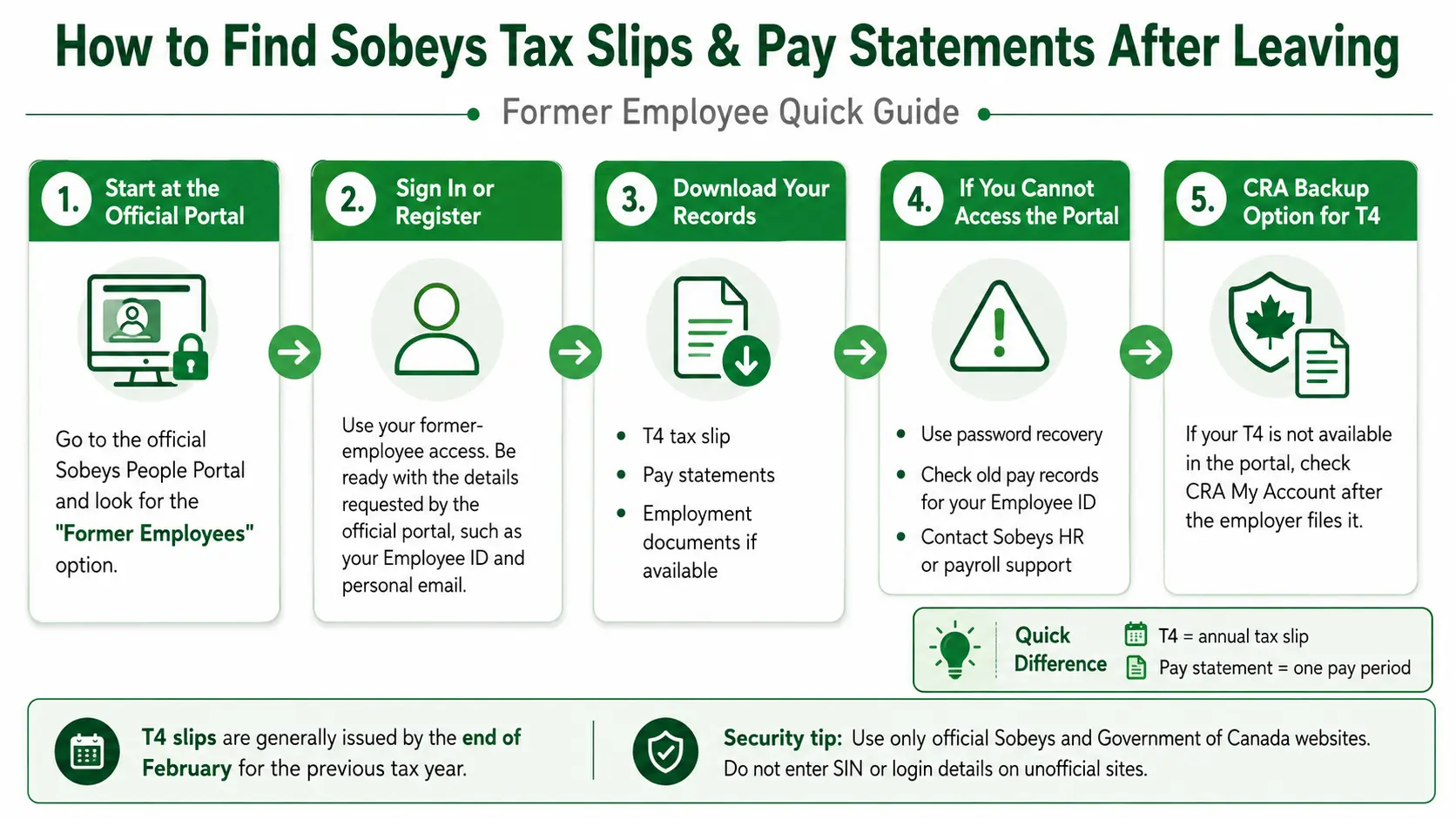
Our former employee guide walks through each screen, including password resets.
People Portal, SuccessFactors, ESS and Dayforce
ESS was the older system. The 2021 rollout notice said ESS would be shut down on March 22, 2021 for the Safeway group it covered (ESS vs People Portal). SAP SuccessFactors is the software that hosts today’s sign-in page. Dayforce is newer: in February 2026 the union reported plans for a single Dayforce mobile app covering pay, benefits, scheduling and more, piloted at Safeway Okotoks since October 2025. The eligibility rules for Sobeys’ 2026 teammate contest also mention registering a Scene+ number in “DayForce/People Portal,” so both names are in use. We could not confirm that every employee has moved to Dayforce.
Safeway, FreshCo, Foodland and other banners
The clearest public People Portal documentation covers Safeway, because the 2021 rollout notice was written for Safeway workers. FreshCo, Foodland, IGA and other banners are part of the Sobeys family, but franchise stores, provinces and union agreements can use different payroll systems. Follow the instructions your own store or employer gives you.
Keep your employee information safe
Frequently asked questions
What is the official Sobeys People Portal address?
www.peopleportal.sobeys.com. It leads to a Sobeys sign-in page hosted by SAP SuccessFactors.
Where do I find my Sobeys Employee ID?
In your hiring or onboarding paperwork. If you don’t have it, ask your manager or HR contact. Your Scene+ number is not your Employee ID.
Why does the login open a SuccessFactors page?
SAP SuccessFactors hosts the Sobeys sign-in page. The page names Sobeys as the company and says “Welcome to your People Portal.”
What happens after five wrong passwords?
The account locks. The password assistant can reset a password but can’t unlock the account, so you need to call the IT Service Centre.
Can former employees still get a T4 or pay statement?
Yes, until April 30 of the year after you leave. Select Continue under the Former Employees message on the sign-in page and register with a personal email.
Is Dayforce replacing the People Portal?
Dayforce is being introduced for some groups, but we couldn’t confirm a full replacement. Sobeys’ 2026 documents still mention both.
Is there a People Portal app?
The People Portal works in a mobile browser. Some groups are getting the Dayforce app. The Sobeys shopping app is for customers, not payroll.
Can I see my work schedule in the People Portal?
Usually not. Scheduling wasn’t on the 2021 list of portal functions, and some groups are moving shifts, time off and swaps to the Dayforce app. Ask your manager which one your store uses.
Do FreshCo employees use the same login?
Not always. FreshCo is part of Sobeys, but franchise stores can run their own payroll. Use the login your store gave you, or ask the HR Service Centre at 1-800-295-3348.
Can this website reset my password?
No. This is an independent guide with no access to any Sobeys account.
Sources
- Sobeys People Portal sign-in page (SAP SuccessFactors) — checked October 2026
- Sobeys “Login to Your People Portal” job aid (the How to Login link)
- Sobeys 2026 Grocery Giveaways teammate rules
- UFCW Local 401: People Portal rollout (March 2021)
- Sobeys Tax & Pay Slips user guide for former employees (linked from the sign-in page)
- UFCW Local 401: former Safeway employees and 2021 T4s (February 2022)
- UFCW Local 401: Dayforce update (February 2026)
How this page was made
We wrote this guide by checking the live sign-in page and the public documents above, and we re-check it when those change. UFCW Local 401 is a union, not Sobeys.
Not affiliated with Sobeys Inc., Empire Company Limited, SAP or any retail banner. Portal screens can change. When Sobeys’ instructions differ from this guide, follow Sobeys. Last reviewed October 2026.