If your Sobeys People Portal account is locked, stop trying different passwords. The current Sobeys SuccessFactors login warns that five failed attempts can lock the account. Its password assistant can reset a password, but it cannot unlock an account after lockout.
If the account is locked, stop entering passwords and use the support route shown on the current Sobeys login page. The password assistant can reset a password, but it cannot unlock an account after lockout.
Why Is My Sobeys People Portal Account Locked?
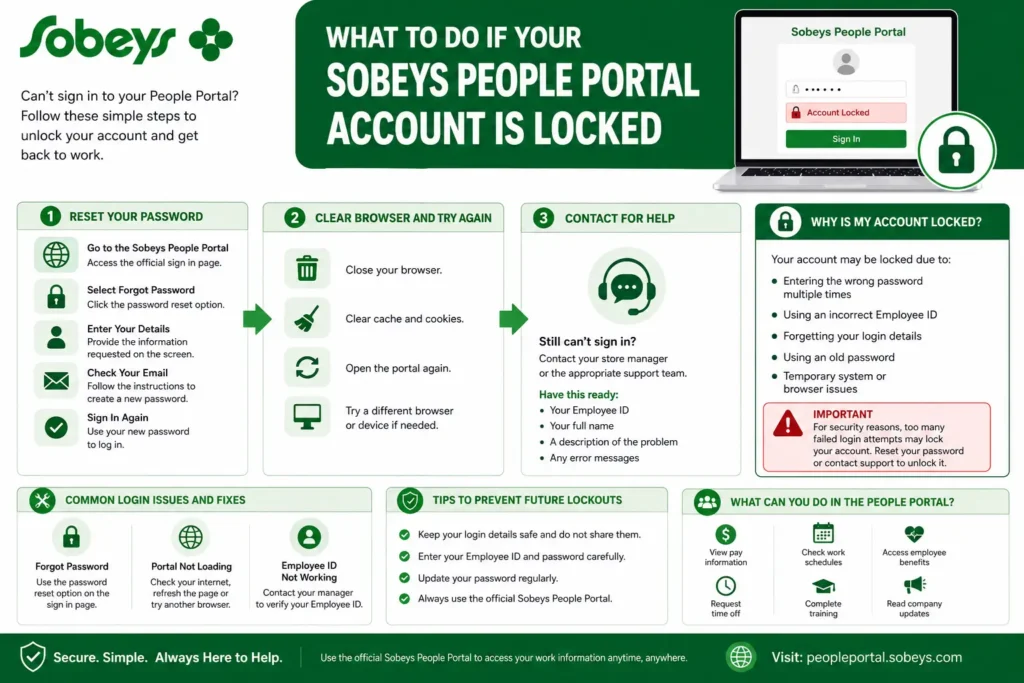
Your account may become locked for several reasons.
- Entering the wrong password multiple times
- Using an incorrect Employee ID
- Forgetting your login details
- Using an old password after a recent password change
- Temporary system or browser issues
A locked account helps protect your personal and work information from unauthorized access.
How to Unlock Your Account?
Forgotten Password vs Locked Account
If you only forgot your password and the account is not locked, use the password assistant on the official Sobeys sign-in page. If the account is already locked, do not keep resetting or guessing passwords. Use the support route shown on the current login page instead.
- Visit the Sobeys People Portal sign in page.
- Use the password assistant only when you need to reset a password and the account is not already locked.
- Enter the information requested on the screen.
- Follow the instructions to create a new password.
- Sign in again using your updated password.
If the reset process works, you should be able to access your account right away.
Clear Your Browser and Try Again
Sometimes the issue is caused by stored browser data.
- Close your browser completely.
- Clear your cache and cookies.
- Open the portal again.
- Enter your login details carefully.
You can also try a different browser or device.
Contact Your Manager or Support Team
If you still cannot access your account, contact your store manager or the appropriate support team. The current Sobeys SuccessFactors login page lists the Solution Centre at 1-877-425-1845 for technical difficulties. It also states that the password assistant cannot unlock an account after lockout.
Be ready to provide the following details.
- Your Employee ID
- Your full name
- A description of the problem
- Any error messages you received
They can help verify your account and guide you through the next steps.
Common Login Problems and Fixes
I Forgot My Password
Use the password reset option on the sign in page.
The Portal Will Not Load
Try these steps given as below.
- Check your internet connection.
- Refresh the page.
- Try another browser.
- Update your browser to the latest version.
My Employee ID Does Not Work
Contact your manager if you are unsure about your Employee ID or account details.
How to Prevent Future Account Lockouts?
Follow these tips to avoid login problems.
Keep Your Login Details Safe
Store your login information in a secure place and do not share it with others.
Enter Information Carefully
Double check your Employee ID and password before selecting Sign In.
Update Passwords When Needed
If your password expires or you think it may be compromised, change it as soon as possible.
Use Official Sobeys Websites
Always access the People Portal through official Sobeys resources.
What Can You Do in the People Portal?
The People Portal helps employees manage important work information.
Depending on your role and location, you may be able to
- Open available pay and payroll information
- Access supported employee and benefits resources
- Use the employee self-service tools assigned to your account
- Access available training or employment resources when shown in your account
Frequently Asked Questions
How do I unlock my Sobeys People Portal account?
Use the password assistant only when the account is not already locked. If the account is locked, use the support route shown on the current Sobeys login page or contact your manager for the correct workplace support process.
Why can I not sign in?
Common reasons include incorrect login details, an expired password, or a temporarily locked account.
Can I access the portal from home?
In many cases, yes. Use the official sign in page and your employee credentials.
Who should I contact for help?
Your store manager or the support resources provided by Sobeys can help with account access issues.
Final Thoughts
A locked account needs a different response from a forgotten password. Check the current Sobeys login page, avoid repeated password attempts, and contact the listed support service when the account is already locked.
Once you regain access, keep your login information secure and use the official portal whenever you sign in.
For more information visit https://peopleportal-sobeys.com/