If you no longer work for Sobeys, you may still need an old pay slip, pay statement, or T4 for tax filing, proof of income, a loan application, or your personal records.
The way you get the document depends on what you need.
- Old pay statements usually come from your former employer
- A T4 reports your annual employment income and tax deductions
- CRA My Account may show your T4 after your employer sends the information to the Canada Revenue Agency
- CRA does not store your individual Sobeys pay statements
Sobeys has used online systems for payroll and tax documents in the past. Some former employees have also used a separate former-employee process.
The exact steps can change. Do not assume that an old login guide, screenshot, or registration process still works today.
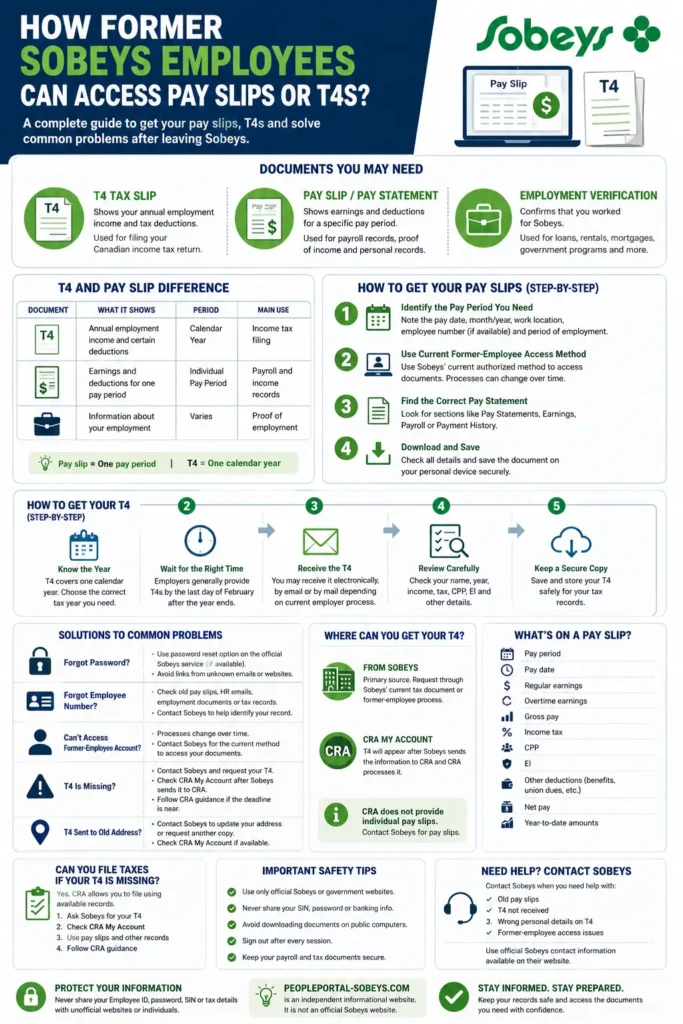
Former employees can use this page for old pay statements and T4s. For the current employee login route, use the Sobeys People Portal login guide. If you only need a T4, the Sobeys T4 guide covers that document in more detail.
Quick answer
First decide whether you need a T4 or an individual pay statement. Use the current Sobeys-approved former-employee method when one is available. If you cannot get your T4 from the employer, check CRA My Account after the employer sends the T4 information to CRA. Contact the employer when you need an individual pay statement.
What Documents Can Former Sobeys Employees Still Need?
You may still need employment records after you leave Sobeys.
Former employees often look for these documents.
- T4 tax slips
- old pay statements
- proof of employment
- earnings records
- payroll records
Each document serves a different purpose.
T4 Tax Slip
A T4 Statement of Remuneration Paid is a Canadian employment tax slip.
Your employer creates a T4 for each applicable calendar year.
The T4 can show information such as
- employment income
- income tax deducted
- Canada Pension Plan contributions
- Employment Insurance premiums
- taxable benefits when they apply
- province of employment
- other reportable employment amounts
Your employer sends T4 information to the Canada Revenue Agency.
You usually use your T4 when you prepare your Canadian income tax return.
Pay Slip or Pay Statement
A pay statement covers a specific pay period.
It may show
- your pay date
- the pay period
- regular earnings
- overtime earnings
- gross pay
- net pay
- income tax deductions
- CPP contributions
- EI premiums
- benefit deductions
- union dues when they apply
- vacation pay
- year-to-date earnings
A former employee may need an old pay statement to check a payment, review payroll deductions, or show past income.
Employment Verification Records
You may also need proof that you worked for Sobeys.
A former employee may need this type of record for
- a rental application
- a mortgage application
- a loan application
- a government program
- an employment history check
- income verification
The organization that asks for the document decides what it accepts.
T4 and Pay Slip Differences
A T4 and a pay slip both show employment-related financial information. They do not serve the same purpose.
| Document | What it shows | Period covered | Main use |
|---|---|---|---|
| T4 | Annual employment income and certain deductions | Calendar year | Income tax filing |
| Pay slip | Earnings and deductions for one payroll period | Individual pay period | Payroll and income records |
| Employment verification | Information about your employment | Varies | Proof of employment |
The easiest way to remember the difference is simple.
- A pay slip covers one pay period
- A T4 covers annual employment tax information
Your final pay statement can also help you compare year-to-date amounts with your T4.
How Former Sobeys Employees Can Get Old Pay Slips
Start with your former employer when you need an old Sobeys pay statement.
CRA My Account does not act as a storage system for individual Sobeys pay slips.
Identify the Pay Period You Need
Before you request an old pay statement, find as much information as you can.
Try to note
- the approximate pay date
- the month and year
- your former work location
- your period of employment
- your former employee number if you still have it
- whether you need your final pay statement or an earlier one
A specific request usually makes the process easier.
For example, ask for the pay statement for a particular payment date instead of asking for every pay statement from your full employment period.
Use the Current Former-Employee Document Method
Sobeys has used an online employee system for pay statements, T4 documents, and employment records.
Historical information also shows that some former employees used a separate former-employee process.
This tells us that Sobeys has provided former-worker document access before.
It does not prove that every former employee follows the same steps today.
The company can change
- registration steps
- identity checks
- account requirements
- menu names
- document access periods
- password recovery methods
Use current employer-approved instructions when you need an old record.
If you need information about the general employee system instead of former-employee documents, use the main employee access guide on this website.
Find the Correct Pay Statement
Look for sections related to
- pay statements
- pay slips
- earnings
- payroll
- payment history
- documents
Do not rely only on old screenshots.
Employers can change menus and page layouts without notice.
Download and Save the Pay Statement
When you find the correct pay statement, check the details before you save it.
Confirm
- your name
- the pay date
- the pay period
- the earnings
- the deductions
- the net pay
Save the document on a private device.
Keep a secure copy because your former-employee access may change later.
How to Get Your Sobeys T4 After Leaving the Company?
You can still receive a T4 after you leave Sobeys.
Your employer reports applicable employment income for the calendar year in which you worked.
If you leave partway through the year, the T4 still covers the income and deductions that apply to that calendar year.
Do Not Expect the T4 Immediately After Leaving
Your employer does not usually give you the annual T4 on the day you leave.
You may receive your final pay statement first.
The T4 follows the normal annual tax-slip schedule.
Canadian employers generally provide T4 slips by the last day of February after the calendar year ends.
Choose the Correct Tax Year
A T4 covers one calendar year.
If you work for Sobeys during several calendar years, you may have several T4 slips.
For example
- income earned in 2024 belongs to the 2024 T4
- income earned in 2025 belongs to the 2025 T4
- income earned in 2026 belongs to the 2026 T4
Choose the correct year before you request or download the document.
Review the T4 Carefully
Check the main details when you receive your T4.
Review
- your name
- the tax year
- the employer information
- employment income
- income tax deducted
- CPP contributions
- EI premiums
- province of employment
Contact the issuer if you find an important error.
Incorrect personal details can also cause problems when CRA tries to match the slip to your account.
When Should a Former Employee Receive a T4?
Employers generally provide T4 slips by the last day of February after the calendar year ends.
This rule still matters after you leave the company.
Do not confuse your last day of work with the T4 deadline.
For example, if you leave Sobeys in August, you may receive your final pay information at that time. Your annual T4 still follows the normal T4 schedule.
For income earned during 2026, the employer generally provides the 2026 T4 by the end of February 2027.
How Can a Former Employee Receive a T4?
Employers can provide T4 slips through different approved methods.
The method may depend on your employment status and the employer’s current process.
Electronic T4
An employer can use a secure electronic system when current CRA rules allow it.
Former employees need special consideration under CRA distribution rules.
Do not assume that your old employee login always remains active after you leave.
Do not assume that every former Sobeys employee automatically receives a T4 through an online employee account.
T4 by Email
An employer may use email when the applicable CRA requirements are met.
Do not assume Sobeys sends every former employee’s T4 by email.
Check the sender carefully when you receive an unexpected tax-document email.
Never enter personal information through a suspicious link.
Paper T4
An employer may also provide a paper copy.
Your mailing address matters when the employer uses mail.
If you move after leaving Sobeys, contact the appropriate employer channel and ask how to update your employment-record address safely.
What If You Cannot Access Your Former-Employee Account?
Former employees can lose access for many reasons.
Common problems include
- a forgotten password
- an unknown employee number
- an old personal email address
- an account that no longer works
- identity details that do not match
- expired access
- old login instructions that no longer match the current process
Do not keep guessing passwords.
Do not send sensitive personal information to an unofficial website.
You Forgot Your Password
Use the password recovery option from the employer-approved service when it is available.
Avoid password reset links from
- unknown emails
- text messages
- advertisements
- social media posts
- unofficial websites
Start from a trusted employer source whenever possible.
You Forgot Your Employee Number
Your former employee number may help Sobeys find your record.
Check documents you already have.
These may include
- old pay statements
- employment paperwork
- HR emails
- tax documents
- previous payroll records
If you still cannot find the number, contact the employer and ask how to verify your former employment record.
Your Identity Information Does Not Match
A former-employee service may ask you to verify your identity.
Historical Sobeys instructions for some former Safeway employees referred to information such as
- Employee ID
- Social Insurance Number
- date of birth
- personal email address
Those instructions apply to an older, specific former-employee process.
Do not assume that Sobeys uses the same verification method today.
Never give this information to an independent blog or unofficial support service.
What If Your Sobeys T4 Is Missing?
A missing T4 does not leave you without options.
Follow these steps.
- Contact the employer or issuer
- Ask for the T4 for the correct tax year
- Check CRA My Account
- Confirm that the employer sends the T4 information to CRA
- Follow current CRA guidance if the tax deadline approaches and the slip is still missing
Ask the Employer for a Copy
Start with the employer when you cannot find your T4.
Explain
- that you no longer work for Sobeys
- which tax year you need
- that you need a T4
- your former work location if it helps identify your record
Do not send your Social Insurance Number through an unverified email address.
Check CRA My Account
CRA My Account may show your T4 after the employer sends the information to CRA and CRA processes it.
This can help when you cannot get the slip directly from your former employer.
You may also find tax slips from earlier years in your CRA account.
Why Your T4 May Not Appear in CRA My Account?
Your T4 may not appear right away.
Common reasons include
- the employer has not sent it yet
- CRA still processes the information
- the slip contains incorrect identifying details
- you check too early in the tax-slip period
Contact the employer if you think the information on the slip contains an error.
Can CRA Provide Old Sobeys Pay Stubs?
CRA My Account does not replace your former employer’s payroll records.
CRA receives tax information slips such as T4 information from employers.
An individual pay statement is a different record.
Use this simple difference.
- T4 goes to CRA as part of employer tax reporting
- Pay statement stays with the employer’s payroll records
Contact your former employer when you need an old Sobeys pay statement.
Use CRA My Account mainly when you need tax-slip information such as a T4.
Can You File Taxes If Your Sobeys T4 Is Missing?
A missing T4 does not always mean that you must miss your tax-filing deadline.
CRA gives instructions for people who cannot get a required tax slip in time.
You may need to use available records such as
- pay statements
- financial records
- year-to-date earnings
- other supporting documents
Follow the current CRA instructions carefully.
A practical order looks like this.
- Ask the former employer for the T4
- Check CRA My Account
- Keep your pay statements and other income records
- Follow CRA guidance if the slip still does not arrive before the filing deadline
Do not assume that you cannot file a tax return just because your T4 is missing.
What Information Is Shown on an Old Sobeys Pay Statement?
A pay statement can contain several types of payroll information.
| Pay statement item | What it generally means |
|---|---|
| Pay period | The dates covered by the payment |
| Pay date | The date the employer pays you |
| Regular earnings | Earnings from regular work |
| Overtime earnings | Additional applicable earnings |
| Gross pay | Earnings before deductions |
| Income tax | Tax withheld from your pay |
| CPP | Canada Pension Plan contribution |
| EI | Employment Insurance premium |
| Other deductions | Applicable benefits, dues, or other deductions |
| Net pay | Amount left after deductions |
| Year-to-date amounts | Cumulative totals for the year |
Your final pay statement can help you compare annual earnings with the amounts on your T4.
Why Former Employees May Need Old Pay Slips?
Old pay slips can help in several situations.
Proof of Previous Income
A landlord, lender, government agency, or other organization may ask for proof of past income.
The organization decides which documents it accepts.
Payroll Disputes
An old pay statement can help you check
- hours
- overtime
- vacation pay
- deductions
- gross earnings
- net pay
Tax Records
Pay statements can help you compare year-to-date earnings with your T4.
They can also help when a T4 goes missing and CRA asks you to use available records.
Personal Recordkeeping
Keep important payroll documents for your own records.
A saved copy can help if your online access changes later.
What If Your T4 Goes to an Old Address?
A move can cause problems when the employer mails your T4.
If Sobeys still has an old address, contact the appropriate employer support channel.
Ask how to update your employment-record address safely.
Do not send personal information through an unverified email address.
If the employer already sends the T4 to CRA, you may also find the tax-slip information in CRA My Account after CRA processes it.
Quebec Former Employees May Also Need a Relevé 1
Former employees who work in Quebec may need an additional provincial tax document.
A Quebec employee may receive a Relevé 1, also called an RL-1, along with applicable federal tax documents.
CRA My Account does not act as the source for every Quebec provincial tax slip.
Check current Revenu Québec guidance if you work in Quebec and need an RL-1.
T4 and W-2 Differences for Former Sobeys Employees
Some people search for a Sobeys W-2 because they know the U.S. tax term.
Canada and the United States use different employment tax forms.
- Canada generally uses the T4 for employment income
- The United States uses the W-2
If you work for Sobeys in Canada and need your annual employment tax slip, search for your T4 rather than a W-2.
How to Keep Old Payroll and Tax Records Secure?
T4 slips and pay statements contain private financial information.
Use these safety steps.
- Use employer-approved or government websites
- Check the website address before you enter personal information
- Keep your Social Insurance Number private
- Avoid downloading tax documents on public computers
- Do not save passwords on shared devices
- Sign out when you finish
- Store downloaded documents in a secure location
Do Not Share Sensitive Information With Independent Websites?
An independent informational website should never ask you to provide
- your Sobeys password
- Employee ID
- Social Insurance Number
- date of birth
- banking information
- T4 details
Do not enter this information just because a website uses the Sobeys name.
Watch for Suspicious Links?
Take extra care with links from
- unsolicited emails
- text messages
- advertisements
- social media
- online forums
Use an official employer or government source when you need to enter private information.
When Should You Contact Sobeys for Help?
Contact the employer when you cannot get a payroll or tax record yourself.
| Problem | Recommended next step |
|---|---|
| Old pay statement is missing | Contact payroll or HR |
| T4 does not arrive | Contact the employer or issuer |
| You forget your employee number | Ask the employer how to identify your record |
| Former-employee access no longer works | Ask about the current document access method |
| Your T4 contains incorrect personal details | Contact the issuer |
| Your T4 does not appear in CRA My Account | Confirm that the employer sends it to CRA |
Use current official Sobeys contact information.
Avoid relying on phone numbers from old articles because support details can change.
Frequently Asked Questions
How do I get my T4 after leaving Sobeys?
Start with the employer’s current tax-document or former-employee process. Check CRA My Account if you cannot get the T4 directly and the employer already sends the information to CRA.
Can former Sobeys employees get old pay stubs?
Yes, former employees may still obtain old pay statements when the employer keeps the records and provides a retrieval method. Contact the employer if online access no longer works.
When should I receive my T4 after leaving Sobeys?
Employers generally provide T4 slips by the last day of February after the applicable calendar year ends.
Does Sobeys give me a T4 immediately when I quit?
Not usually. You may receive your final pay statement when you leave. The annual T4 normally follows the regular T4 reporting schedule.
What should I do if my Sobeys T4 is missing?
Contact the employer first. Then check CRA My Account after the employer sends the T4 information to CRA.
Can I get my Sobeys T4 from CRA My Account?
CRA My Account may show the T4 after the employer submits it and CRA processes the information.
Why does my T4 not show in CRA My Account?
The employer may not send it yet, CRA may still process it, or the slip may contain an error in your identifying information.
Can CRA give me old Sobeys pay stubs?
No. CRA does not act as your former employer’s pay-statement archive. Contact the employer when you need individual pay slips.
Can I file taxes if my T4 is missing?
CRA provides guidance for people who cannot obtain a tax slip in time. Keep your pay statements and follow current CRA instructions.
Is a pay stub the same as a T4?
No. A pay stub covers an individual pay period. A T4 reports annual employment tax information.
What if I forget my former Sobeys employee number?
Check old pay statements, employment documents, or previous HR emails. Contact the employer if you still cannot find it.
Can I request a paper T4?
You can ask the issuer about a paper copy when you need one. The delivery method depends on current employer and CRA requirements.
What happens if my T4 goes to an old address?
Contact the employer and ask how to update your employment-record address or request another copy. Check CRA My Account if the employer already sends the T4 information to CRA.
Does every former Sobeys employee use the same online process?
No. Former-employee processes can vary by time, business unit, and system changes. Use current employer-approved instructions.
Is PeoplePortal-Sobeys.com an official Sobeys website?
No. PeoplePortal-Sobeys.com is an independent informational website. Do not submit your employee password, Social Insurance Number, banking details, T4 information, or other private employment credentials to this website.
Final Answer for Former Sobeys Employees
Former Sobeys employees should first decide whether they need an individual pay statement or an annual T4.
Follow these steps.
- Identify the document and year or pay period you need
- Use the employer’s current authorized former-employee method
- Contact Sobeys when an old pay statement is not available
- Check CRA My Account when a T4 is missing
- Confirm that the employer sends the T4 information to CRA
- Follow CRA guidance when the tax deadline approaches and the T4 still does not arrive
- Keep all payroll and tax documents secure
Do not assume that an old employee login or historical registration guide still matches the current process.
Protect your Employee ID, password, Social Insurance Number, tax documents, and other personal information whenever you access old employment records.
This article uses current Canada Revenue Agency guidance, public Sobeys contact information, and historical Sobeys instructions for background. It treats old Sobeys instructions as historical information rather than current rules.
Interesting guide on Sobeys pay stubs and T4s. Quick takeaway: if you’re in beauty and running a shop, staying on top of docs is a must—kind of like keeping inventory and tax records clean. In Suplery we offer a professional beauty business platform that combines inventory and order management with a built-in online shop, plus real-time stocktakes for zero-onboarding. This kind of streamlined system helps barbershops and salons stay compliant and efficient. My take is that having a single dashboard for suppliers and automated order prediction can save time and cut chaos. If you’re handling clients and products, consider checking Suplery for a smoother workflow.
Thank You..