You can still get your Sobeys pay slips and T4s after you leave, but there’s a clock on it. Sobeys’ own guide for former employees says your access runs until April 30 of the year after you leave. Miss that and you’re calling HR instead of downloading a PDF.
Former employees don’t use the normal Employee ID and password boxes. You go through a separate service called Tax & Pay Slips, and the first visit takes about ten minutes because you have to register.
Last reviewed: October 20, 2026. We checked this page against the live sign-in page and the Sobeys guides it links to.
This site is not Sobeys. Only type your Employee ID and password on the official sign-in page.
Open the official People Portal ↗What you need before you start
- Your old Employee ID (Sobeys calls it your Former Employee ID)
- Your date of birth
- Your Social Insurance Number
- A personal email address you can open right now
If you don’t have your Employee ID, check an old pay statement or your hiring paperwork. If it’s nowhere, the guide says to call the HR Service Centre at 1-800-295-3348.
How to get into the Tax & Pay Slips service
These steps follow Sobeys’ user guide for former employees, which is linked from the sign-in page itself.
1. Open the former-employee route
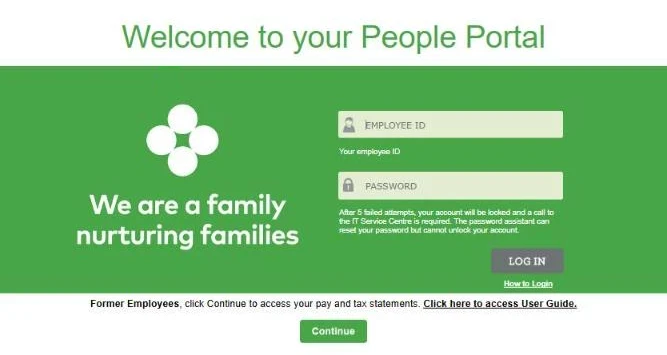
Go to www.peopleportal.sobeys.com. Leave the Employee ID and password boxes empty. Under the green panel there’s a line that starts with “Former Employees”. Select the Continue button under it.
2. Register (first visit only)
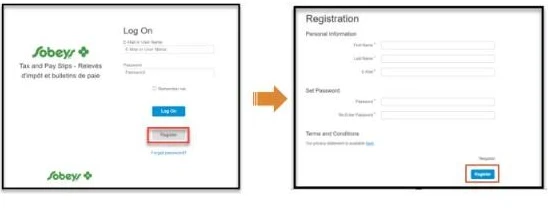
- On the Log On page, select Register.
- Type your first name, last name and personal email.
- Make a password that follows the rules on screen and type it again.
- Tick the privacy statement box and select Register.
- Open the email Sobeys sends you and click the link in it.
3. Confirm who you are
Next comes a short form for your SIN, your Former Employee ID and your date of birth. The date goes year first, four digits, then a two-digit month and day. Sobeys’ example is 1968 06 27.
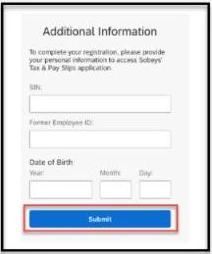
Be careful here. You get five tries. After the fifth wrong attempt the account is blocked for good, and the guide’s only fixes are to register again with a different personal email or call HR.
4. Find the slip you need
Once you’re in, the top of the page shows your separation date and an Access Expiration Date. Write that date down somewhere.
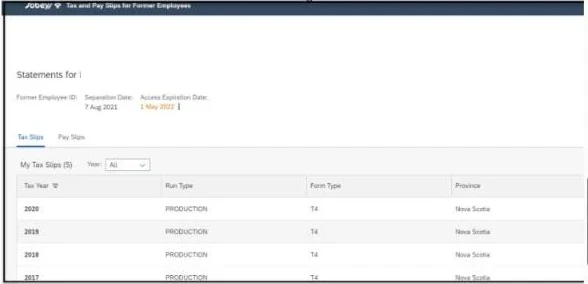
- For a pay slip, open Pay Slips and pick the payment date.
- For a T4, open Tax Slips and pick the year. Quebec workers may also see a Relevé 1 listed there.
Download every year you might need later, including older ones. Once the expiration date passes, the PDFs are gone from here.
Logging in again later
Go back to www.peopleportal.sobeys.com, select Continue, and sign in with the email and password you registered. Not your old Employee ID.
Forgot the password you made?
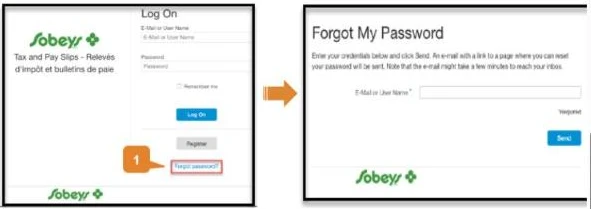
- Select Forgot password? on the Log On screen.
- Enter the email you registered with and select Send.
- Open that inbox and use the Password Reset button in the email.
If your access has already run out
Call the HR Service Centre at 1-800-295-3348 or email hrservicecentre@sobeys.com. Have your old Employee ID, the dates you worked and the store location ready.
For a missing T4, also check CRA My Account. Once Sobeys files your T4 with the Canada Revenue Agency it usually shows up there, and CRA keeps slips from past years. CRA won’t have your individual pay slips though. Those only come from Sobeys. Our T4 guide covers late and missing slips in more detail.
Questions people ask us
Can I still get my T4 if I left last year?
Yes, until April 30 of the year after you left. After that, try CRA My Account or call the HR Service Centre at 1-800-295-3348.
Why doesn’t my old Employee ID and password work?
Former employees use the separate Tax & Pay Slips service. Select Continue on the sign-in page and log in with the personal email you registered.
I got blocked after entering my SIN wrong. Now what?
Sobeys’ guide says you can register again with a different personal email, or call the HR Service Centre for help.
Do FreshCo or franchise employees use this too?
Not always. Franchise stores can run their own payroll. Ask the store you worked at which system they used.
Is this website part of Sobeys?
No. We’re an independent guide. We can’t see your records, and you should never type your SIN or Employee ID anywhere on this site.
PeoplePortal-Sobeys.com is an independent guide, not Sobeys. We never ask for your Employee ID, password or SIN.