If you no longer work at Sobeys, you may still need your T4 tax slip, old pay statements, or other employment records.
Start with the Sobeys People Portal and look for the option provided for former employees. Sobeys’ People Portal was introduced with the ability to download pay statements, T4 income-tax documents, and employment verification letters.
There is also documented evidence of a separate former-employee process. In instructions provided by Sobeys and published by UFCW Local 401, former Safeway employees were directed to the Former Employees section of the Sobeys People Portal to retrieve their T4.
If you cannot get your T4 through Sobeys, you may also be able to find it through CRA My Account after the employer has filed the slip with the Canada Revenue Agency.
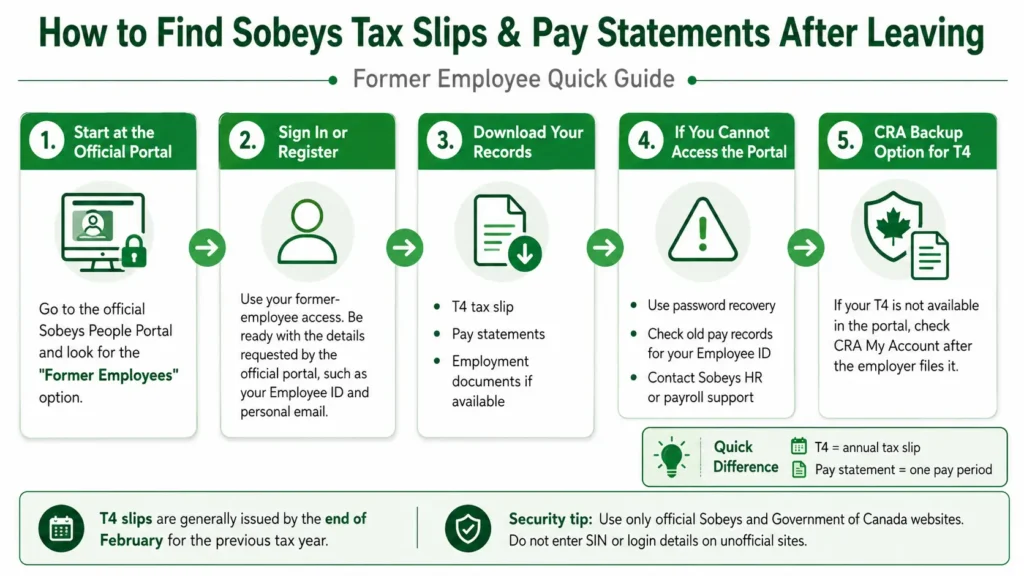
Quick Answer for Former Sobeys Employees
Try these options in this order.
- Go to the official Sobeys People Portal.
- Look for the Former Employees area.
- Follow the current instructions shown there.
- Sign in if you already have a former-employee account.
- Create an account if the official portal tells you to register.
- Look for your T4 or available pay statements.
- Download the records you need to a private device.
- If your T4 is unavailable, check CRA My Account after it has been filed.
- Contact the appropriate Sobeys HR or payroll team if you still cannot get the document.
Do not enter your Employee ID, Social Insurance Number, date of birth, or tax information on an unofficial employee-login website.
Can You Access Sobeys Tax Slips After Leaving?
Yes, former employees still need access to tax information related to the income they earned while working for Sobeys.
Sobeys’ People Portal rollout specifically included the ability to download:
- Pay statements
- T4 income-tax documents
- Employment verification letters
It also included employee information and other HR services.
However, former-employee access should not be treated as permanent.
The login method, available documents, and length of portal access can change. Follow the instructions displayed on the official Sobeys system when you access it.
How to Find Your Sobeys T4 After Leaving?
Your T4 Statement of Remuneration Paid summarizes employment income and certain deductions reported for a calendar year.
If you recently left Sobeys, use the following process.
1. Start With the Sobeys People Portal
Go directly to the official Sobeys People Portal rather than searching for a login form on an unrelated website.
Historical Sobeys instructions provided to former Safeway employees directed them to:
peopleportal.sobeys.com
Those instructions specifically told former employees to find the Former Employees section at the bottom of the portal home page.
Because portal screens can change, use the wording currently displayed on the official site rather than expecting the page to look exactly like an older guide.
2. Choose the Former Employee Option
Look for wording such as
- Former Employees
- Tax and Pay Slips
- Former Employee Access
- T4
- Tax Documents
Do not use the normal current-employee login if the portal provides a separate former-employee route.
3. Follow the Current User Guide
In the Sobeys-provided instructions published in 2022, former employees were told to open the User Guide and then select Continue.
That process may have changed since then.
Treat the current instructions on the official portal as the final authority.
4. Sign In or Register
If you already created a former-employee account, use your existing account where the portal instructs you to do so.
If you have never used the former-employee service, you may need to register.
The documented former-Safeway process required first-time users to have:
- Employee ID
- Social Insurance Number
- Date of birth
- Personal email address
These requirements come from Sobeys instructions published for former Safeway employees in Alberta in 2022, so you should not assume every former Sobeys employee will see the exact same registration process today.
Enter sensitive information only when you are certain you are using the authorized Sobeys service.
5. Open Your Tax Documents
After signing in, find the area for tax documents, T4 statements, payroll documents, or similar records.
Choose the correct tax year.
For example, if you need employment income earned during 2025, select the 2025 T4 rather than the year in which you happen to download it.
6. Download Your T4
Open the document and save a copy to a secure personal device.
You may also want to keep a backup with your other tax records.
Avoid storing tax documents on:
- Public computers
- Shared workplace computers
- Unprotected cloud accounts
- Shared family devices without password protection
How to Find Old Sobeys Pay Statements After Leaving?
A pay statement, sometimes called a pay stub or payslip, is different from a T4.
The original Sobeys People Portal rollout specifically stated that employees could immediately download pay statements through the portal.
If former-employee access still provides your old statements, follow these basic steps.
Open the Pay or Payroll Area
After signing in through the authorized former-employee route, look for sections named something similar to:
- Pay
- Pay Statements
- Pay Slips
- Payroll
- Earnings
The exact wording may vary.
Select the Correct Pay Period
Choose the date or pay period you need.
Check that the statement belongs to the correct year and pay cycle before downloading it.
Download the Statement
Save the PDF or other available document to your personal device.
If you need several statements, download each required pay period before your former-employee access expires or changes.
T4 vs Sobeys Pay Statement
A T4 and a pay statement are not the same document.
| Document | What it is used for | How often it is normally created |
|---|---|---|
| T4 tax slip | Reports annual employment income and tax-related amounts | Once for the applicable calendar year |
| Pay statement | Shows earnings, deductions and net pay for a pay period | Each applicable pay period |
| Employment verification letter | Helps confirm employment information | When requested or made available |
Sobeys’ People Portal documentation lists T4s, pay statements, and employment verification letters separately.
This distinction matters if you are applying for a loan, checking old deductions, preparing a tax return, or proving past employment.
What If You Cannot Log In After Leaving Sobeys?
Losing normal employee access after leaving a company is not unusual.
Do not repeatedly enter random passwords or Employee IDs.
Work through the problem based on what you see.
| Problem | What to do |
|---|---|
| Current employee login rejects you | Look for the former-employee option |
| Forgot your password | Use the recovery option shown on the authorized portal |
| Employee ID is rejected | Check old employment or payroll records |
| T4 is missing | Check the tax year and then contact the issuer |
| T4 is not available through Sobeys | Check CRA My Account after the slip has been filed |
| Old pay statements are unavailable | Contact the appropriate Sobeys payroll or HR channel |
| Portal page will not load | Try an updated browser and verify that you are using the correct official address |
Do not create multiple accounts unless the official instructions tell you to do so.
What If You Forgot Your Sobeys Employee ID?
Former employees may forget their Employee ID after leaving.
Before contacting support, check documents you already have, such as,
- Previous pay statements
- Old onboarding documents
- Employment paperwork
- Tax or payroll records
- Previous authorized employee communications
Do not publish your Employee ID online or send it to an independent employee-portal website.
If you still cannot identify it, use the HR or payroll contact method provided in your Sobeys departure paperwork or other official communication.
What If You Forgot Your Former Employee Password?
First use the password-recovery option displayed by the official portal, if one is available.
Make sure you enter the same personal email address that you used when creating the account.
Also check
- Spam folder
- Junk folder
- Typing errors in your email address
- Browser autofill using an old password
If self-service recovery does not work, contact the appropriate employer support channel rather than giving your credentials to a third-party website.
Can You Get a Sobeys T4 From CRA My Account?
Yes, this can be an important second option.
The CRA says that you may be able to view a current or previous-year tax slip through CRA My Account if the issuer has already submitted it to the CRA.
The basic order is
- Ask the employer or issuer for the missing slip.
- Check CRA My Account.
- Select the appropriate tax year.
- Look for the T4 filed by the employer.
CRA My Account can help with the T4 tax slip.
It should not be confused with the Sobeys payroll portal.
Can CRA Show Your Old Sobeys Pay Stubs?
No. CRA tax-slip access is not an archive of your individual Sobeys pay statements.
If you need a particular weekly or biweekly pay statement, you generally need to get it from the employer’s available payroll records or request help from the appropriate payroll or HR channel.
Why Is My Sobeys T4 Not Showing in CRA My Account?
A T4 does not automatically appear in CRA My Account immediately when you leave your job.
The CRA states that it cannot provide a copy until the issuer has sent the tax slip to the CRA.
If the T4 is missing:
- Confirm you selected the correct tax year.
- Check again later if the filing period has not passed.
- Ask the employer or issuer for your copy.
- Verify that CRA has received the slip.
Do not assume that a missing online T4 means the employer did not create one.
Timing can matter.
When Should You Receive Your T4?
According to current CRA guidance, most slips such as T4s are provided by the issuer by the end of February following the calendar year they cover.
For example:
If you worked for Sobeys during 2026, the applicable 2026 T4 would normally be provided by the end of February 2027, subject to the CRA rules that apply.
Your last day of work and your T4 issue date are not the same thing.
Leaving Sobeys in August does not normally mean you receive the year’s T4 immediately in August.
Does Sobeys Still Have to Provide a T4 After You Leave?
Leaving the company does not make your employment income disappear from tax reporting.
CRA rules specifically address former employees.
Current CRA guidance says the general rule that allows employers to distribute certain slips through a secure employer portal without prior consent has exceptions. One of those exceptions applies when a person is a former employee at the time a T4 is issued. CRA also provides rules for paper delivery and copies.
This is important because you should not assume that losing access to the Sobeys People Portal means you have lost your right to receive the required tax information.
Can a Former Sobeys Employee Request a Paper T4?
CRA rules provide for paper distribution of T4 slips, including delivery in person or by mail to the employee or recipient’s last known address when paper distribution is used.
If you have left Sobeys and cannot reasonably use the electronic system, contact the appropriate employer/payroll channel and ask about the available way to receive your T4.
It is also important to keep your mailing information accurate with the employer when possible.
What If You Need Your T4 Before You Can Get a Copy?
The CRA recommends first asking the employer or issuer for a missing slip.
If you still cannot obtain it before you need to file your tax return, CRA provides guidance for estimating income using available pay stubs or financial statements. CRA says you should keep supporting records and explain what you are doing to obtain the missing slip.
Because tax situations vary, follow the current CRA instructions rather than simply guessing the values shown on your T4.
Should You Download Pay Records Before Leaving Sobeys?
If you know your employment will soon end, saving the personal employment records you are allowed to keep can prevent problems later.
Consider downloading available copies of:
- Recent pay statements
- Previous T4 slips
- Employment verification documents you need
- Other personal payroll records provided for your use
Do this before your routine employee access changes.
Do not download confidential business information, internal company files, customer data, or documents that you are not authorized to keep.
How to Protect Your Sobeys Tax and Payroll Information?
Tax slips contain sensitive personal information.
Use a few basic security rules.
- Access employee records only through an authorized portal.
- Check the website address before entering login details.
- Never enter your SIN into an independent Sobeys information blog.
- Do not share your password.
- Avoid public Wi-Fi when downloading tax documents.
- Save your files on a protected personal device.
- Log out when you finish.
- Do not send a T4 through unsecured messages unless there is a valid reason and secure process.
An informational website can explain the process, but it should never collect Sobeys employee credentials or Social Insurance Numbers.
Former Sobeys Employee T4 and Pay Statement FAQs
Can former Sobeys employees access their T4 online?
There is documented evidence of Sobeys providing former employees with online T4 access. In 2022, Sobeys instructions published by UFCW Local 401 directed former Safeway employees to the Former Employees section of the People Portal to access a T4. Current access and procedures may differ.
How do I get my Sobeys T4 after leaving?
Start with the authorized Sobeys People Portal and check the former-employee option. If you cannot obtain the T4 there, ask the employer for a copy or check CRA My Account after the slip has been filed.
Can I get my Sobeys T4 through CRA?
You may be able to view it in CRA My Account after the issuer sends the T4 information to the CRA.
Can CRA give me my Sobeys pay statements?
CRA My Account can provide access to certain tax slips, but it is not a Sobeys pay-statement archive. Contact the employer if you need individual payroll statements.
Why can’t I see my T4 yet?
It may not have been filed yet, or you may be checking the wrong tax year. CRA says it cannot provide a tax slip until the issuer submits it.
When should I get my T4?
CRA says T4 slips generally must be provided by the last day of February following the calendar year to which they apply.
Are a T4 and pay stub the same?
No. A T4 summarizes annual employment income and tax information. A pay statement shows details for an individual pay period.
What if I forgot my Sobeys Employee ID?
Check previous pay records and employment documents first. If you still cannot find it, contact the appropriate Sobeys HR or payroll support route.
Can I use my old employee password after leaving?
Do not assume the current-employee credentials will continue working. Use the former-employee process provided by Sobeys and follow the current login or registration instructions.
How long can former Sobeys employees use the People Portal?
Do not assume former-employee access lasts forever. Access periods and portal procedures can change. Download personal documents you legitimately need while access remains available.
Can I get an old Sobeys T4 from a previous year?
CRA says My Account may provide current or previous-year tax slips when the issuer has submitted them to CRA.
What should I do if the Sobeys People Portal is not working?
Confirm that you are using the authorized portal, try another current browser, and look for the former-employee route. If the problem continues, use an official Sobeys HR or payroll contact method. For a T4, CRA My Account may provide another option once the slip has been filed.
Conclusion
If you leave Sobeys, you may still need T4 tax slips and old pay statements.
Start with the Sobeys People Portal and use the former-employee route shown there. Sobeys has previously provided a dedicated online process for former employees to obtain T4 documents, while the People Portal itself was designed to provide access to pay statements and T4s.
If you cannot retrieve your T4 from Sobeys, check CRA My Account after the employer has submitted the slip. For individual Sobeys pay statements, you may need to use available former-employee payroll access or contact the employer.
Most importantly, use only authorized Sobeys and Government of Canada services when entering employee, payroll, SIN, or tax information.
Fact-check note: This guide was reviewed against Sobeys People Portal information published by UFCW Local 401 and current Canada Revenue Agency tax-slip guidance available in August 2026. The documented former-employee Sobeys instructions are historical and were specifically published for former Safeway employees in Alberta, so current Sobeys portal screens and access rules should always take priority.